Best AI Tools for Students in 2026: Free Options, Study Tips, and What Actually Works
Table of Contents
- Why you need AI tools in 2026
- The 6 best AI tools for students
- Studying and exam prep
- Notes to study guide in minutes
- Summarizing textbooks without losing details
- Research papers and writing
- Tutoring and personalized learning
- What does AI cost for students?
- Privacy: what happens to your data
- 5 tips to get more out of AI
- Your 10-minute action plan for better grades
- AI beyond the classroom
- How to get started
Why you need AI tools in 2026
Students who use AI effectively are learning faster, research deeper, and write better drafts in less time. AI tools for students have gone from novelty to necessity in the span of two years.
Here is what changed: AI models got good enough to be genuinely useful for academic work. Not just "summarize this article" useful, but "help me understand why this theorem works and quiz me on it until I actually get it" useful. The students who figured this out early have a real advantage. They spend less time on mechanical tasks and more time on thinking.
But there is a gap. Most students are not getting the full value out of AI yet. They open ChatGPT, ask a question, get an answer, and close the tab. They never build context. They never let the AI learn how they think, what courses they are taking, or what their professor actually cares about. Every session starts from scratch.
This guide covers the best AI tools available to you right now, which ones are free, how to actually use them for studying, and the habits that can make the biggest difference.
Quick check: How are you currently using AI for school?
a) I use it for everything
b) Mostly for writing help
c) Occasionally for research
d) I have not really startedIf you answered b, c, or d, you are leaving a lot on the table. Keep reading.
The 6 best AI tools for students

Not all AI tools are built the same. Here are the ones that actually matter for academic work in 2026, ranked by how useful they are for students specifically.
 1. ChatGPT
Best for: General questions, brainstorming, first drafts, explaining concepts in plain language.
You probably already use this one. ChatGPT is the most versatile AI assistant available. It handles everything from "explain quantum entanglement like I am five" to "help me outline a research paper on supply chain disruptions." The free tier is functional. The paid tier ($20/month) gives you faster responses and access to the latest model.
Memory: ChatGPT has persistent memory that saves facts about you and learns from your conversation history. It works well within ChatGPT, but your memory does not carry over to any other AI tool. Full breakdown of how ChatGPT memory works.
Student tip: Use custom instructions to tell ChatGPT your major, your year, and how you like explanations. This saves you from re-explaining your context every time.
 2. Claude
Best for: Long-form writing, nuanced analysis, reading and summarizing dense papers.
Claude is excellent at understanding long documents. If you need to upload a 50-page PDF and ask questions about it, Claude handles that better than most alternatives. Its writing style tends to be more natural and less robotic, which helps when you are using it to improve your own drafts. Free tier available. Pro is $20/month.
Memory: Claude periodically summarizes your conversations and carries forward what it determines to be the most relevant context. It also supports project-based organization to keep different workflows separated. Memory is locked to Claude. Full breakdown of how Claude memory works.
Student tip: Use Claude for your hardest reading assignments. Upload the paper and ask it to explain the main argument, the methodology, and the key findings in your own words.
 3. Gemini
Best for: Research with real-time information, Google Workspace integration, multimodal tasks.
If you live in Google Docs, Sheets, and Drive (and most students do), Gemini plugs directly into your workflow. It can reference your documents, search the web for current information, and help you build presentations. The free tier is generous.
Memory: Gemini combines explicit saved information with automatically learned context from your past interactions. It also integrates deeply with your Google account. The full automatic personalization requires a paid plan. Full breakdown of how Gemini memory works.
Student tip: Use Gemini when you need up-to-date information for a research paper. It pulls from current sources, which is useful when your textbook is two years behind.
 4. DeepSeek
Best for: Math, coding, step-by-step problem solving, technical coursework.
If you are in STEM, DeepSeek is worth knowing about. It excels at mathematical reasoning, formal logic, and code generation. The step-by-step reasoning traces let you follow the logic instead of just getting an answer. And the web chat is free.
Memory: DeepSeek does not currently have persistent memory. Every session starts fresh. This is its biggest limitation for ongoing academic work. Full breakdown of DeepSeek's memory limitations.
Student tip: Use DeepSeek for problem sets. Ask it to solve the problem step by step, then try to solve a similar one yourself. Compare your reasoning to its reasoning.
 5. NotebookLM (Google)
Best for: Analyzing study materials, creating summaries from your own sources.
NotebookLM lets you upload your own documents (lecture notes, textbooks, papers) and ask questions about them. It only answers based on your uploaded sources, which means it does not hallucinate random information. It can also generate audio summaries. Free to use.
 6. Anuma
Best for: Using multiple AI models with one memory, privacy, switching between tools without losing context.
Here is the problem with using ChatGPT for one class and Claude for another: neither one knows what you told the other. You end up re-explaining your major, your courses, and your project details every time you switch. Anuma solves this by giving you access to ChatGPT, Claude, Gemini, DeepSeek, and more in one app with one memory that works across all of them. Tell it your major once. Every model knows it. Your data stays on your device. Free to start with a limited amount of credits.
Memory: Unified memory across every model and every device. Your context follows you from ChatGPT to Claude to DeepSeek without repeating yourself. Encrypted on your device. Never used for training. Exportable anytime.
Student tip: Set up your memory with your courses, your learning style, and your upcoming deadlines. Every future conversation starts with that context already loaded, no matter which model you use.
Other tools worth knowing
Otter.ai — Live lecture transcription. Records and transcribes your classes so you can focus on listening instead of writing everything down.
Grammarly — Grammar, clarity, and tone suggestions for essays and reports. Works in your browser and most writing apps.
Perplexity — AI-powered search with citations. Useful for finding sources quickly when you need to back up a claim in a research paper.
Anki — Spaced repetition flashcards. If you want to memorize large volumes of material (anatomy, vocabulary, case law), this is the gold standard.
Studying and exam prep
Think of AI as a study partner that never gets tired. Here is how to use it effectively:
Active recall
Instead of re-reading your notes, ask the AI to quiz you. "Give me 10 practice questions on Chapter 7 of my organic chemistry textbook." Then answer them without looking at your notes. This is the single most effective study technique, and AI makes it effortless to do.
Feynman technique
Explain a concept to the AI in your own words. Ask it to identify gaps in your understanding. "I am going to explain how monetary policy affects inflation. Tell me what I can improve." This forces you to think instead of passively absorbing information.
Practice exams
Ask the AI to generate a practice exam based on your syllabus. Specify the format your professor uses (multiple choice, short answer, essay). If you have shared your course details in your AI memory, it already knows the material you need to cover.
Concept mapping
Ask the AI to show how different concepts connect. "How does Keynesian economics relate to what we covered in fiscal policy last week?" This builds the kind of deep understanding that separates A students from B students.
Spaced repetition scheduling
Tell the AI your exam date and ask it to create a study schedule. "My constitutional law exam is on May 20th. I have 8 chapters to review. Create a spaced repetition schedule." It will distribute your study sessions for maximum retention.
Try this right now: Pick one concept from your hardest class. Open any AI and ask it to explain that concept in three sentences. Then try a different model and compare the explanations. You'll see how each one frames it differently, and which one clicks for you.
Do this on Anuma
Here is what happens when you ask ChatGPT, Claude, Grok, and Gemini the same question using Council Mode:

Four models, one prompt, one unified answer. council mode
Notice how each model takes a slightly different approach. ChatGPT uses the ice cube example. Claude focuses on the bedroom analogy. Grok explains why disorder is more probable. Gemini frames it around energy and effort. The unified answer combines the best from all four into one clear explanation. That is the value of comparing models instead of relying on just one.
Notes to study guide in minutes
Picture this: it is Sunday night and you have a stack of notes from three weeks of lectures. You have lecture slides from three weeks, a textbook chapter, and some scribbled notes from a study group. The exam is Tuesday. Sound familiar?
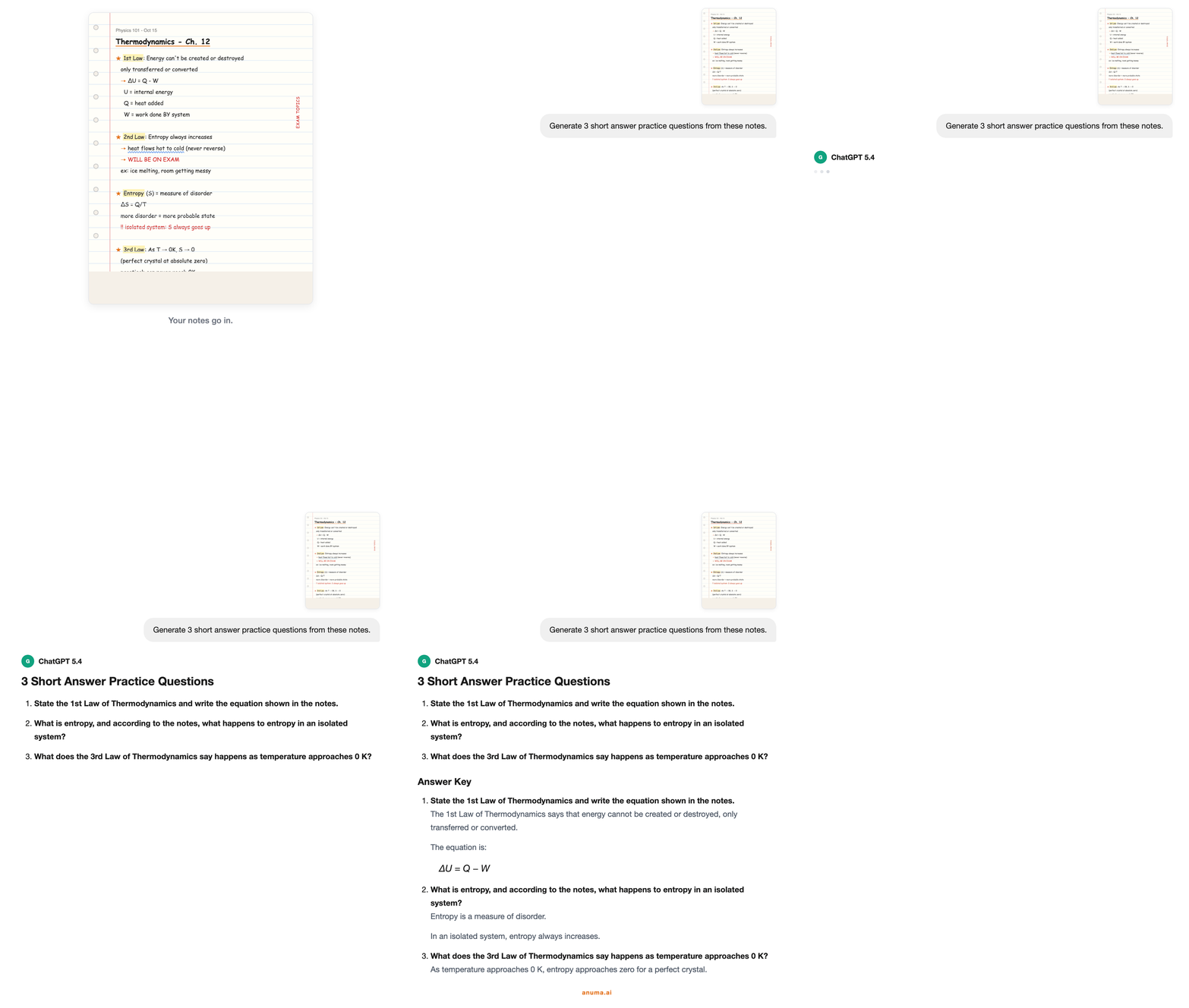
This is where AI works as a study guide maker. Instead of spending hours organizing your materials, you can upload your notes and let AI do the extraction for you. Think of it as an Input-Process-Output workflow:
- Input: Upload your notes, lecture slides, or PDF. Before you do, spend 30 seconds cleaning up: delete off-topic ramblings or fix major typos so the AI focuses on testable facts rather than confusing errors.
- Process: The AI scans your materials and pulls out key vocabulary, core concepts, important dates, and relationships between ideas. It identifies what is likely to be on the test based on emphasis and repetition in your source material.
- Output: You get structured summaries, flashcards, practice questions, and outlines, all generated from your actual course material, not generic content from the internet.
What AI can generate from your notes
- Multiple-choice questions to spot tricky concepts and test yourself on distinctions your professor likes to test.
- True/False sets for quick knowledge checks during short study sessions.
- Term and definition flashcards to master key vocabulary through active recall.
- Summary outlines to review the big picture before diving into details.
- Timeline and sequence maps for history, science, or any subject where order matters.
Why this works better than re-reading
Most students study by re-reading their notes. Cognitive science is clear: this barely works. Your brain confuses recognition ("this looks familiar") with actual recall ("I can explain this from memory"). Re-reading is like watching someone else lift weights. Active recall, forcing yourself to pull a fact from scratch without looking at the answer, is doing the lifting yourself.
AI handles the tedious setup so you can jump straight to the testing. Instead of spending an hour making flashcards, you upload your notes and have a practice quiz in under a minute. The time you saved on setup is time you spend actually learning.
Try this: Take the notes from your most recent lecture. Upload them to any AI tool and type: "Generate 10 practice questions from these notes: 5 multiple choice and 5 short answer. Focus on concepts the professor emphasized." Time yourself. It takes under 60 seconds. Now take the quiz without looking at your notes. That one exercise is more effective than re-reading the notes three times.
Do this on Anuma
Upload your notes or PDF to any model on Anuma. Ask it to generate a study guide with practice questions.
Summarizing textbooks without losing details
A fifty-page chapter is a lot to take in. Knowing what to focus on, what to skim, and what to save for later makes all the difference. AI-powered summarization acts like a smart highlighter that already knows what matters most.
But "summarize this chapter" is too vague. You will get a generic overview that misses the details your professor cares about. Instead, try these specific prompts:
- "List all bold terms with definitions." This captures the vocabulary you will be tested on, organized for flashcard creation.
- "Summarize these 10 pages into 5 bullet points." Forces the AI to identify what actually matters rather than giving you a slightly shorter version of the same wall of text.
- "Create a chronological timeline of events." Perfect for history, political science, or any course where sequence matters.
- "Identify the three most testable concepts in this chapter." This requires the AI to make a judgment call about exam relevance, which is often surprisingly accurate.
- "Explain how [concept A] relates to [concept B]." This builds the kind of connective understanding that separates strong exam answers from surface-level ones.
From summary to study material
Once you have a clean summary, do not just read it. Turn it into active study material:
- Take the summary and ask the AI to generate a practice test from it.
- Take the test without looking at the summary.
- Review what you missed and ask the AI to explain those concepts differently.
- Ask the AI to explain the concepts you missed, using different analogies or examples.
- Take a follow-up quiz in two days (spaced repetition).
This loop (summarize, test, review, retest) is the gold standard for retention. Each cycle strengthens the neural pathways for that information, and the AI handles all the material creation so you can focus entirely on understanding.
Physical handouts and OCR
Not everything is digital. If your professor hands out printed worksheets or you take notes by hand, many AI tools support photo uploads. Snap a picture of your handwritten notes or printed material, upload it, and the AI will extract the text using optical character recognition (OCR). From there, it works the same way: summaries, flashcards, and practice quizzes generated from your actual course material.
Do this on Anuma
Upload your textbook chapter or lecture PDF to any model on Anuma. Because your memory already knows your courses, it tailors the summary to what your professor emphasizes. Try sending the same chapter to Claude for a narrative summary and to DeepSeek for a structured outline, then combine the best of both.
Pro tip: If your AI has memory, it gets better at summarization over time. After a few study sessions, it learns what level of detail you need, which subjects need more attention, and how your professor frames questions. The first summary is good. The tenth summary, with that accumulated context, is significantly better.
Research papers and writing
This is where most students either underuse AI or misuse it. The goal is not to have AI write your paper. It is to have AI help you think through your argument, find gaps in your reasoning, and produce better drafts in less time.
Research phase
- Finding sources: Use Perplexity or Gemini to find relevant papers and articles. Both provide citations, which saves you from manually searching databases.
- Understanding papers: Upload a dense paper to Claude and ask it to summarize the argument, explain the methodology, and identify the key findings. Then read the paper yourself with that framework in mind.
- Identifying gaps: Ask the AI what your sources disagree on, or where the research is thin. This often becomes the most interesting part of your paper.
Writing phase
- Outlining: Describe your thesis and ask the AI to suggest a structure. Do not accept the first outline. Push back. "This structure does not account for the counterargument. Where should that go?"
- Drafting: Write your own first draft. Then ask the AI to identify weak arguments, unclear sentences, and logical gaps. This is more valuable than having it write for you.
- Editing: Ask the AI to tighten your language without changing your voice. "Make this paragraph more concise but keep my tone." If your AI has memory, it already knows your writing style.
Citation and integrity
Always verify citations that AI provides. AI tools can generate plausible-sounding citations that do not exist. Use them to find real sources, then verify each one yourself. Your university's academic integrity policy applies to AI-assisted work, so understand what is allowed before you submit.
Do this on Anuma
Use Gemini for research (it pulls from current sources), Claude for drafting and editing (it holds your writing style in memory), and Council Mode to get feedback on your thesis from multiple models at once. Your memory keeps your paper topic, sources, and professor's requirements loaded across every session so you never re-explain the assignment.
Tutoring and personalized learning
AI can be a surprisingly effective tutor when you use it the right way. Here is what actually works and a few things to keep in mind.
What works
- Explaining concepts at your level. Unlike a textbook, AI adjusts its explanation based on what you already know. Ask it to explain the same concept at different levels until it clicks.
- Unlimited patience. You can ask the same question ten different ways without feeling embarrassed. The AI does not judge.
- Available 24/7. Office hours are two hours a week. AI is always on. At 2 AM before a midterm, that matters.
- Personalized practice. AI can generate unlimited practice problems at the difficulty level you need. Too easy? Ask for harder ones. Too hard? Ask it to break the concept down further.
Keep in mind
- Use AI to understand, not to shortcut. The real value is in working through problems with AI, not copying answers. Ask it to explain the steps, then try solving the next one yourself.
- Always double-check the math. AI can occasionally make calculation errors. Use AI to learn the method, then verify by solving problems yourself.
- Keep the human element. AI is great for the mechanical parts of studying, but study groups, office hours, and relationships with professors matter just as much. Use both together.
Do this on Anuma
Tell Anuma your course, your current level, and what you find confusing. It remembers all of that. Next time you say "I still don't get derivatives," it knows your history and adjusts. Try different models as tutors: Claude explains with analogies, DeepSeek walks through the math step by step. Your memory means you never restart from scratch.
The best study workflow: Use AI to prepare before class (pre-read and summarize the material). Attend class and take notes. After class, use AI to quiz yourself on what you learned. Before the exam, use AI to generate practice tests. This loop is more effective than re-reading notes, and it takes less total time.
What does AI cost for students?
Here is what you would pay to access the major AI tools individually:
| Tool | Free tier | Paid price | What paid gets you |
|---|---|---|---|
| ChatGPT | Yes (limited) | $20/month | Latest model, faster responses, image generation |
| Claude | Yes (limited) | $20/month | More usage, larger uploads, priority access |
| Gemini | Yes (generous) | $20/month | Gemini Pro, deeper Google integration |
| DeepSeek | Yes (full) | Free | Web chat is free. API has costs. |
| Anuma | Yes (limited) | $9.99/month | All models, unified memory, Council Mode, Creative Studio |
The math: If you subscribe to ChatGPT and Claude separately, that is $40/month or $480/year. Anuma gives you both plus Gemini, DeepSeek, Grok, and more for $9.99/month ($120/year). For students on a budget, the difference matters.
If you only need one tool and you are not picky about which model you use, the free tiers are fine. If you use AI seriously for multiple classes across different subjects, one subscription that covers everything is more practical than juggling free tiers.
Privacy: what happens to your data
You are sharing personal information with these tools: your name, your school, your courses, your essay drafts, your study habits, your research topics. It is worth understanding what happens to that data.
What most platforms do
- ChatGPT: Conversations may be used for training by default on consumer plans. You can opt out in settings. Data is stored on OpenAI's servers.
- Claude: Similar to ChatGPT. Consumer plans may be used for training. Opt-out available. Data on Anthropic's servers.
- Gemini: Conversations may be used for training. Data is tied to your Google account alongside everything else Google knows about you.
- DeepSeek: Data may be processed on servers in China. May be used for training. Broad data collection scope.
What to look for
- Can you opt out of training? Check your settings. Most platforms allow this, but the default is usually opt-in.
- Where is your data stored? On the company's servers, or on your device?
- Can you delete your data? Most platforms let you, but deletion timelines vary.
- Is your data encrypted? Most platforms encrypt in transit but not at rest on their servers.
The private option
If privacy matters to you (and it should), Anuma encrypts your data on your device by default. Your conversations and memory are never stored on corporate servers, never used for training, and never accessible to anyone but you. For students working on sensitive research or personal projects, this is the most private way to use AI.
5 tips to get more out of AI
1. Use AI to think better, not think less. The most effective way to use AI is as a thinking partner. Ask it to challenge your arguments, explain where your reasoning has gaps, and push you to go deeper. The learning happens in the conversation, not in the output.
2. Set up your context once. Instead of re-explaining your courses and preferences every session, use an AI tool with memory. Set up your context once and every future conversation starts faster and produces more relevant results.
3. Try more than one model. ChatGPT is great at some things. Claude is better at others. DeepSeek is strongest for math. Each model has different strengths. Using the best model for each task gives you better results across the board.
4. Always verify. AI is a powerful starting point, but it is not always right. It can generate plausible-sounding citations that do not exist, or make calculation errors. Treat AI output as a strong first draft that benefits from your review.
5. Be intentional about privacy. You are sharing your academic work, your ideas, and your learning journey with these platforms. Take a moment to check your privacy settings, understand how your data is handled, and consider using a platform that encrypts your data by default.
Your 10-minute action plan for better grades
You do not need to overhaul your entire routine. This daily workflow takes 10 minutes and compounds over the semester:
- Upload your notes or a study PDF from today's class.
- Generate a summary and study guide. Ask the AI to pull out key terms, concepts, and relationships.
- Take a 5-question quiz generated from the material. Do not look at your notes.
- Review what you missed. Ask the AI to explain those concepts differently.
- Schedule a follow-up in two days. Tell the AI your exam date and ask it to remind you what to review.
This builds spaced repetition automatically, the gold standard for long-term retention. By reviewing material at increasing intervals, you move information from short-term to long-term memory instead of cramming everything into one night.
If you are using Anuma, this workflow is even faster because the AI already knows your courses. You do not need to type "I am a junior economics major taking macroeconomics with Professor Chen" every time. That context is loaded automatically. You just upload your notes and say "quiz me."
The math: 10 minutes per day, five days a week, is 50 minutes of active study per week. Over a 15-week semester, that is 12.5 hours of structured, high-quality practice, spread across the entire term instead of crammed into one night. Students who study this way consistently outperform students who study twice as many total hours but do it all in the last week.
AI beyond the classroom
AI is not just for studying. The same tools that help you ace your exams can make the rest of your life easier too. And if your AI has memory, it already knows your preferences, your budget, your schedule, and your friend group. You don't need a different app for each part of your life.
Trip planning with friends
Planning a trip with five people usually means 200 messages and zero decisions. Instead, add AI to the group chat. On Anuma, you can add Coco to any iMessage or SMS group at (917) 625-9972. Everyone can ask questions, get recommendations, and build an itinerary together. "Find three Airbnbs near Santa Cruz under $200/night that sleep 6." "What's the best route from SF with two stops for food?" The AI handles the research. Your group makes the decisions.
Language learning
Studying abroad next semester? Traveling somewhere new this summer? Use AI as a conversation partner. Tell it your current level and ask it to chat with you in that language. It will correct your grammar, suggest better phrasing, and adjust difficulty as you improve. Unlike a language app, it adapts to the topics you actually want to talk about. If your AI has memory, it remembers your level and picks up where you left off each session.
Resume, cover letters, and internships
Your AI already knows your major, your projects, and your skills (if you set up memory during the school year). Ask it to tailor your resume for a specific job posting. "Rewrite my experience section for this product management internship at Stripe." It can also run mock interviews: "Ask me 5 behavioral interview questions for a marketing role and give me feedback on my answers."
Cooking on a budget
"I have eggs, rice, soy sauce, and one sad tomato. What can I make?" AI gives you a recipe in seconds. Take it further: "Create a meal plan for the week under $40 with a grocery list." If it remembers your dietary preferences and what you've cooked before, the suggestions get better over time.
Creative projects
Write a short film script for your YouTube channel. Generate social media captions that match your tone. Brainstorm podcast episode ideas. Create images for a personal project. AI handles the first draft and the brainstorming. You bring the creative direction. Use Council Mode to get three different takes on the same idea and pick the one that feels right.
Personal finance
First apartment? First taxes? First time splitting a lease? Ask your AI to explain rental terms, compare insurance options, or build a monthly budget based on your income. "I make $2,000/month from my part-time job. Rent is $800. Build me a budget that includes saving $200/month." It's like having a financially literate friend available anytime.
Fitness and wellness
"Build me a 4-day workout plan. I have dumbbells and a pull-up bar." "Create a 10-minute morning routine for stress management." "I slept 5 hours last night, have a presentation at 2pm, and need to be sharp. What should I do between now and then?" AI adapts to your situation. With memory, it tracks your goals and adjusts over time.
Side projects and new skills
Want to learn Python over the summer? Build a personal website? Start a newsletter? AI can be your tutor, your co-builder, and your editor. It explains concepts at your level, generates starter code, reviews your work, and helps you get unstuck. The learning curve for almost anything gets shorter when you have an AI that already knows your skill level and learning style.
Do this on Anuma
Everything above works with the same memory you built during the school year. Your AI already knows your food preferences, your budget, your fitness goals, and your career interests. Add Coco to a group chat at (917) 625-9972 to plan trips with friends. Text Anuma at (415) 994-5505 when you're on the go. One memory across school, summer, and everything in between.
The point: The AI that helped you study for organic chemistry can also plan your summer road trip, help you nail your internship interview, and teach you to cook something other than ramen. One memory across all of it. You don't start over when the semester ends.
How to get started
You do not need to overhaul your study routine overnight. Start with one change:
This Week
Pick your hardest class. Before your next study session, open an AI tool and say:
"I am a [your year] [your major] student. I am studying [topic] for [course name]. My exam is on [date]. Quiz me on the key concepts."
Do this once and you will see the difference immediately.
This Month
Try at least two different AI models for different tasks.
Use ChatGPT for brainstorming and Claude for reading dense papers.
OR
Use DeepSeek for math and Gemini for research. Notice which model works best for which subject.
This Semester
Set up your AI memory with your full course load, your learning preferences, and your academic goals.
Let the AI learn how you think. By midterms, it will know your courses well enough that every conversation starts with useful context instead of a blank slate.
This Summer
Keep using the same AI for trip planning, side projects, internship prep, and learning new skills. Your memory carries over. The AI that helped you study for finals also knows your budget, your interests, and your career goals. It all builds on itself.
The students who figure this out early will have a meaningful advantage. Not because AI does their work for them, but because it removes the friction that slows everything down. Less time re-explaining. Less time on mechanical tasks. More time for the thinking, creating, and living that actually matters.
One subscription instead of three: Instead of paying $20/month each forChatGPT, Claude, and Gemini, Anuma gives you every model in one app withshared memory for $9.99/month. Your study context carries across all of them.
Every model. One memory. One price. Start studying smarter today. Subscribe now →